How to Create an Invoice as a Photographer: A Practical Guide for Your Photo Shoots
If you’re a professional photographer, you probably enjoy planning photo shoots, editing images, and delivering beautiful galleries much more than dealing with administrative tasks. However, knowing how to create an invoice as a photographer is essential for running your business smoothly, keeping track of your income, and maintaining professional relationships with your clients.
Whether you specialize in weddings, family portraits, newborn photography, product photography, or commercial projects, every job involves administrative details that need to be properly managed. What information should you include on an invoice? When should you charge sales tax? How do you handle deposits for upcoming sessions? And what can you do to avoid mistakes and late payments?
In this guide, we’ll answer these questions with practical examples to help you spend less time on paperwork and more time doing what you love.
We’ll also show you how to simplify these tasks using an invoicing system for photographers that helps you create invoices, track payments, and keep your photography business organized in one place.

What Should a Photography Invoice Include?

An invoice is much more than a document showing how much a client owes you. It’s a professional record of the services you’ve provided and an important part of keeping your photography business organized.
Whether you’re invoicing a family portrait session, a wedding package, or a commercial photography project, including the right information will make the payment process clearer for both you and your client.
Start by adding your business details, including your name or business name, contact information, and business address. Depending on your business structure and applicable requirements, you may also need additional identifying information.
Next, include your client’s name and relevant billing details. You should also assign a unique invoice number so you can easily identify and track each transaction.
The invoice date is another important element, along with the payment due date and, when useful, the date of the photography session.
Make sure you describe the services clearly. Instead of simply writing “Photography session,” consider using something more specific, such as “Two-hour family photography session, including 30 professionally edited digital images.”
If the client has purchased additional prints, albums, or editing services, list those items separately.
Finally, include the price of each service, the subtotal, any applicable sales tax, and the total amount due.
You can also add payment instructions, accepted payment methods, and any relevant terms previously agreed upon with the client.
Remember, a clear and professional invoice helps avoid misunderstandings, improves your client’s experience, and makes it much easier to keep track of your photography business finances.
How to Create an Invoice as a Photographer Step by Step

Once you know what information to include, the next step is learning how to put everything together.
Creating a photography invoice doesn’t have to be complicated. In fact, having a consistent process can save you valuable time, especially when you’re managing multiple bookings, client orders, and upcoming sessions.
Start by identifying the photography services you’re billing for. A simple portrait session will probably have fewer items than a wedding package that includes several hours of coverage, a photo album, travel expenses, and additional edited photographs.
Each service should be described clearly so your client understands exactly what they’re paying for.
Next, enter the agreed price for each item and calculate the total. If sales tax applies to the transaction, include the appropriate amount based on your business location, the services provided, and the relevant state or local requirements.
Example of an Invoice for a Family Photography Session
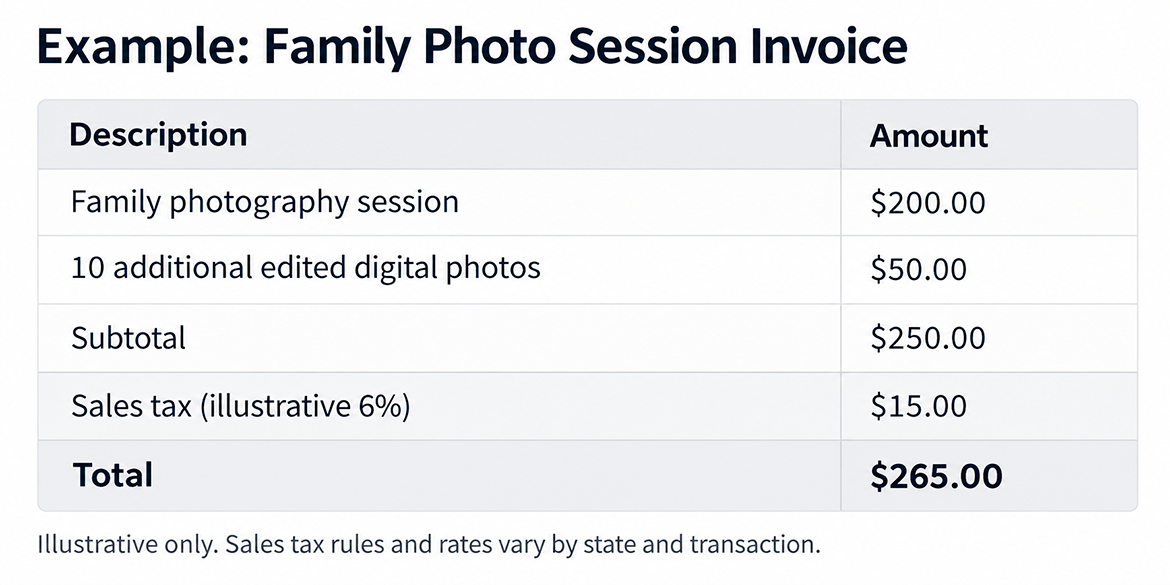
This example uses a hypothetical 6% sales tax rate for illustration purposes. Actual tax treatment and rates depend on the applicable state and local rules.
In this example, the client would pay $265.00. If they’ve already made a deposit, you’ll need to account for that payment when calculating the remaining balance.
Before sending the invoice, double-check the client details, service descriptions, amounts, and payment terms.
Finally, send the invoice to your client and keep a copy in your business records.
One practical recommendation is to follow the same invoicing process for every job. This will help you avoid mistakes and save time when you have several photography sessions to invoice during a busy week.
What Taxes Should Photographers Consider When Creating Invoices?

One of the most common questions photographers have when preparing invoices involves taxes.
In the United States, there isn’t a single nationwide sales tax rate that applies to all photography services. Instead, sales tax rules can vary depending on the state, locality, type of service, and products being sold.
For example, a photographer selling printed photographs, albums, or other physical products may have different sales tax obligations from someone who only provides digital photography services.
Some states tax certain photography services or digital products, while others have different rules.
That’s why it’s important to understand which taxes apply to your particular business before adding them to your invoices.
What About Income Tax for Photographers?
Income tax works differently from sales tax.
If you’re a self-employed photographer, you generally need to report your business income and may have federal income tax and self-employment tax obligations.
However, these taxes are not normally added to your clients’ invoices as separate charges.
Instead, they’re part of your own business tax responsibilities.
For this reason, it’s important to distinguish between the taxes you may need to collect from customers and the taxes you pay on your business income.
A good invoicing system can help you keep track of what you’ve billed and collected throughout the year, making it easier to organize your financial records.
You don’t need to turn every invoice into a complicated accounting document. The important thing is to include the correct information, apply sales tax where required, and maintain accurate records.
If you’re unsure about the tax requirements that apply to your photography business, consulting a qualified tax professional is always a good idea.
How to Invoice Photography Sessions with Deposits and Advance Payments

Asking for a deposit is common practice in the photography industry, particularly for weddings, newborn sessions, holiday mini-sessions, and projects that require clients to reserve a specific date.
Deposits can help photographers secure bookings, plan their schedules, and reduce the risk of last-minute cancellations.
However, it’s important to keep these payments organized so you always know how much a client has paid and how much is still outstanding.
Imagine a couple books a wedding photography package for $1,500 and agrees to pay a $300 deposit to secure their date.
The remaining $1,200 will be due before the final photo gallery is delivered, assuming no additional charges or applicable taxes.
In this situation, you should record the initial payment and clearly show the outstanding balance in your payment records and subsequent invoice.
It’s also important to remember that the tax treatment of deposits and advance payments can vary depending on the applicable state and the nature of the transaction.
Tips for Managing Payments for Your Photography Sessions
If you want to avoid payment-related problems, establish your payment terms before confirming a booking.
Tell your client how much the session costs, whether a deposit is required, when the remaining balance must be paid, and which payment methods you accept.
It’s also a good idea to explain what happens if the client cancels or reschedules the shoot.
A photography contract can help you document these agreements and make sure both parties understand the conditions.
With Arcadina, you can manage booking payments, create invoices linked to your sessions, and keep your client information organized through your management dashboard.
Keeping a clear record of deposits and outstanding balances will help you avoid confusion and provide a smoother, more professional experience for your clients.
Common Mistakes to Avoid When Creating Photography Invoices

When you’re busy shooting weddings, editing galleries, delivering albums, and responding to client inquiries, administrative tasks can easily take a back seat.
However, small invoicing mistakes can lead to unnecessary delays, payment disputes, and extra work.
One of the most common errors is sending invoices with incorrect or incomplete information. A missing client name, an inaccurate amount, or a duplicated invoice number can make it harder to organize your records and resolve questions later.
Another frequent mistake is using vague service descriptions.
For example, if a client purchases a maternity photography session, a printed album, and several additional digital images, it’s better to list these items separately rather than combining everything under a generic description.
Failing to keep track of deposits and partial payments is another common problem.
If you’ve received multiple payments from a client but haven’t recorded them properly, you could accidentally request an amount they’ve already paid or lose track of the remaining balance.
To avoid these situations, establish a simple routine for reviewing invoices and outstanding payments.
Spend a few minutes each week checking which sessions have been invoiced, which invoices have been paid, and which clients still have an outstanding balance.
Another important point is to avoid changing previously issued invoices without keeping a clear record of the correction. Depending on your circumstances, you may need to issue an updated or correcting document.
Finally, try not to spread your client information across multiple spreadsheets, email conversations, and separate applications.
Using a centralized system makes it easier to find documents, monitor payments, and keep your photography business organized, especially during your busiest seasons.
Simplify Your Photography Invoicing with Arcadina
Now that you know how to create an invoice as a photographer, it’s time to think about how you can simplify the process and spend less time on administration.
If you’re a freelance photographer or manage a small photography studio, you’re probably responsible for much more than taking pictures.
You also need to answer inquiries, manage bookings, prepare contracts, deliver galleries, collect payments, and issue invoices.
That’s why using a platform that brings these tasks together can make a real difference in your daily workflow.
With Arcadina’s invoicing system for photographers, you can create standard and simplified invoices, prepare drafts, manage corrections, and keep track of payment statuses from one dashboard.
You can also generate invoices directly from photography sessions created through Booking or from orders placed in your client galleries.
This means you won’t have to repeatedly enter information that’s already available in other areas of your business.
Another useful feature is the ability to download invoices as PDFs and send them to your clients by email or WhatsApp.
You can also organize invoices using labels and statuses, helping you quickly identify which payments are pending and which have already been received.
Best of all, these tools are part of an integrated platform specifically designed for photography professionals.
By connecting your website, bookings, client galleries, contracts, and invoicing, Arcadina helps you simplify everyday management tasks and provide a more professional experience for your clients.
If you’d like to spend less time dealing with paperwork and more time growing your photography business, we encourage you to discover how to manage your photography invoices with Arcadina.
Because staying organized behind the scenes is just as important as creating beautiful photographs.
And you, how do you currently manage invoices and payments for your photography sessions?
Arcadina goes with you
Fulfil your dreams and develop your career with us. We offer you to try our web service free for 14 days. And with no commitment of permanence.
Arcadina is much more than a website, it is business solutions for photographers.
If you have any queries, our Customer Service Team is always ready to help you 24 hours a day, 7 days a week. We listen to you.
Quotes · Contracts · Invoices
Quotes, contracts and invoices in one place
Invoices and quotes · Digital signature · Linked to your bookings