Payment link: collect payment for your photography services more conveniently
Managing payments for a photography business isn’t always as straightforward as it seems. Between bookings, pending photo shoots, album enlargements, photo sales and bespoke commissions, photographers often have to remind clients about payments, send bank details or answer queries to help clients complete the process.
To help you with this vital part of day-to-day management, at Arcadina we’ve introduced a new tool that lets you create payment links from your Management Dashboard and send them directly to your clients. This way, you can make collecting payment for your photography services quicker, more organised and more convenient for both parties.

When the payment process is straightforward, clients proceed with greater confidence and photographers save time to focus on what matters most: their work.
What is a payment link and how can it help your photography business?

A payment link is a URL that you can send to your client so they can make an online payment easily. Instead of having to explain how to make a bank transfer, wait for them to ask for your bank details or manage each case manually, you can create a link with the relevant amount and share it via email, WhatsApp or another usual channel.
For the client, the process is much more convenient because they simply need to click on the link and complete the payment. For the photographer, it’s a more efficient way to manage one-off payments, outstanding amounts or additional services without wasting time on repetitive tasks.
This feature fits in very well with the workflow of a photography studio, where not all payments are made at the same time or for the same reason.
Benefits of using payment links in your photography studio
Before looking at some specific examples of creating payment links, it’s worth considering the benefits this tool can bring to the day-to-day management of a photography studio. Payment links not only make it easier for the client to complete a payment more conveniently, they also help the photographer to organise their collections more effectively, reduce manual tasks and offer a clearer, more professional experience from the first point of contact right through to the final payment. Here are some of the benefits of this tool:
- You make payment easier for the client. The simpler the payment process, the less friction the client will face in completing it. Sending a direct link avoids unnecessary explanations and allows the client to pay from home, on their mobile, or at a time that suits them best.
- You save time managing payments. You won’t have to type in payment details every time, go back through old conversations or prepare personalised instructions. You create the link, send it, and make the process much clearer from the outset.
- You project a more professional image. A well-managed payment link conveys organisation and trust. The customer feels that the whole process, from booking to final payment, is well looked after and forms part of a professional experience.
- You can use it for one-off or customised payments. Not all payments always fit within an online shop or a fixed booking. There are special orders, extensions, outstanding payments or additional services that require a more flexible solution. That’s where payment links can be particularly helpful.
Create payment links from the Arcadina Management Panel
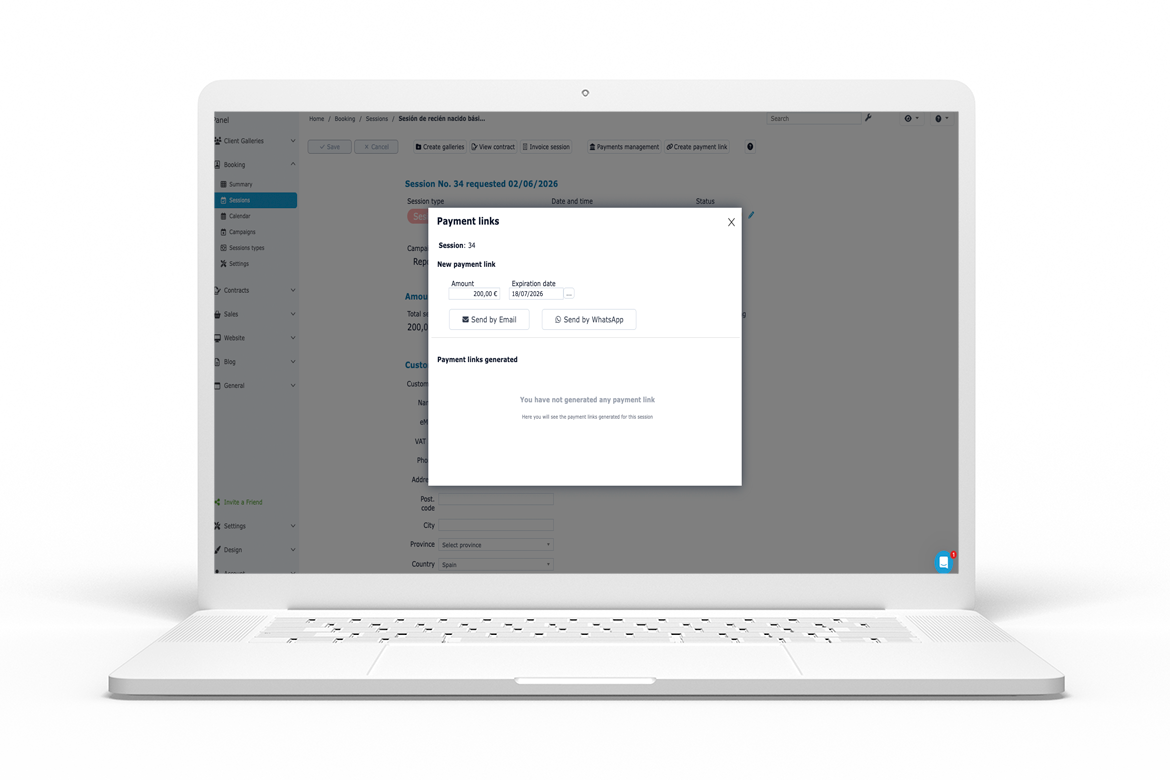
With this new tool, you can generate payment links directly from your Arcadina Management Panel and send them to the relevant client. The idea is to give you more control over your payments without having to leave your usual working environment. Furthermore, these payment links can be created from different sections of the dashboard: client galleries, invoices and Booking bookings. This allows you to tailor each payment to the actual context of the work: a purchase of photographs, an invoice that has already been issued or a booking made via the online calendar.
Until now, it was already possible to set up different payment methods within our management dashboard for public galleries, private galleries and session bookings, such as bank transfer, card, PayPal, RedSys, Stripe or Bizum, amongst others. With this new feature, the payment link becomes an even more practical tool for managing specific payments directly. The aim is not just to collect payments online, but to do so in a more professional manner, one that is more convenient for the customer and easier to monitor from your own management system.
>> Arcadina Help. Client Galleries – Payment Methods – Payment Link
Practical examples of how to use payment links
- Collecting the outstanding payment for a session. If a client has booked a photo shoot and paid a deposit, you can create a payment link for the remaining amount and send it to them. This makes it easier for them to complete the payment quickly and avoids confusing reminders.
- Create a payment link from an invoice. Once you have issued an invoice for a session, a wedding photo shoot or the purchase of additional images, you can generate a payment link linked to that invoice. This way, the customer knows exactly how much they need to pay and can settle the amount in a more convenient way.
- Send a payment link from a Booking reservation. If a client makes a booking via your online booking calendar and you need to collect a deposit, complete the payment or manage an outstanding balance, you can create the link directly from Booking. This allows you to link the booking, the service booked and the payment within a single workflow.
- Selling add-ons or extra products. After delivering a gallery, it’s common for the customer to want to add pages to the album, order printed copies or purchase additional products. In these cases, you can create a specific link to collect payment for that add-on.
- Collect payment for bespoke photo reports. For bespoke corporate sessions, event coverage, special family sessions or one-off commissions, the payment link allows you to send the client a direct link to pay exactly the agreed amount.
- Manage payments following a conversation. If you arrange a service via WhatsApp or email, you can send the payment link through the same channel to streamline the process.
- Collect payment for extra services after an event. Additional photographs, extra albums, extended downloads, prints or supplementary videos can be managed more efficiently with a payment link.
Create payment links and streamline your customers’ experience
Payment links are a very useful tool in the day-to-day running of a photography business. They help to streamline the process, organise payments and offer customers a more convenient experience. At Arcadina, we continue to introduce improvements designed to enable photographers to manage their business from a single platform: client galleries, online bookings, contracts, invoicing, quotes, sales and now also payment links to collect payment for services more efficiently.
This new feature can help you simplify many day-to-day payment processes. From outstanding payments to bespoke services, payment links allow you to provide your clients with a direct and convenient way to complete the transaction. Because selling your photography services doesn’t end when the client says yes. It’s also important that the payment process is simple, clear and professional. And with Arcadina’s payment links, that step can be much easier.
And to wrap up, we’d love to know: were you aware of this new feature that lets you create payment links within your management dashboard? We look forward to reading your comments.
Arcadina goes with you
Fulfil your dreams and develop your career with us. We offer you to try our web service free for 14 days. And with no commitment of permanence.
Arcadina is much more than a website, it is business solutions for photographers.
If you have any queries, our Customer Service Team is always ready to help you 24 hours a day, 7 days a week. We listen to you.