Booking for photographers: how we’re improving the management of your bookings
Managing your photography session bookings quickly, efficiently and easily is essential for saving time in the day-to-day running of your digital business. That’s why, at Arcadina, we’re continuing to improve our Booking service for photographers – a tool designed to help you automate much of the booking process and keep your photography session schedule, booking payments and invoicing under control, all from a single place.
Over the last few months, we’ve been working on a gradual revamp of the Arcadina Management Dashboard. We’re updating its various screens, reorganising the information and, above all, simplifying processes so that carrying out routine tasks becomes increasingly intuitive. And Booking for Photographers is one of the tools to which we’re applying all these improvements. The aim isn’t simply to give the dashboard a more modern look. We want you to be able to find each option more quickly, carry out certain actions in fewer steps and have a much clearer understanding of what’s happening with each of your photo shoot bookings.
In this article, we’ll show you how the Booking for Photographers service is evolving and some of the improvements we’re introducing to make managing bookings even easier.

The easier it is to manage your photo shoot bookings, the more time you’ll be able to devote to your clients, your photography and growing your business.
Booking for photographers is evolving to make your work even easier
The Booking service for photographers was created with a very specific aim: to help you organise your photo shoots and allow your clients to make bookings online without the need for constant messages, phone calls or emails to find an available date.
Using this tool, you can create campaigns and different types of sessions, set your availability, allow your clients to select a date and time, manage payments related to the booking, generate invoices automatically and keep your diary organised. What’s more, you can manually add any bookings you receive through other channels to get a much more comprehensive overview of your upcoming sessions.
But having so many features also means that the Management Dashboard needs to evolve to make using them increasingly straightforward. That’s why we’ve thoroughly reviewed all the options in Booking for Photographers from the ground up. It’s not simply a matter of changing the look of the screens. We’ve analysed how you use each section, what information you need to have most readily available, and assessed which processes we could simplify.
The aim has always been that when you log back into Booking, you’ll quickly find what you’re looking for, and that common tasks such as checking a booking, amending a session or reviewing your booking calendar require as few steps as possible. This update is part of a wider process we’re undertaking at Arcadina to update the entire Management Dashboard and offer you a simpler, more organised and intuitive experience.
A simpler, clearer and more intuitive booking calendar
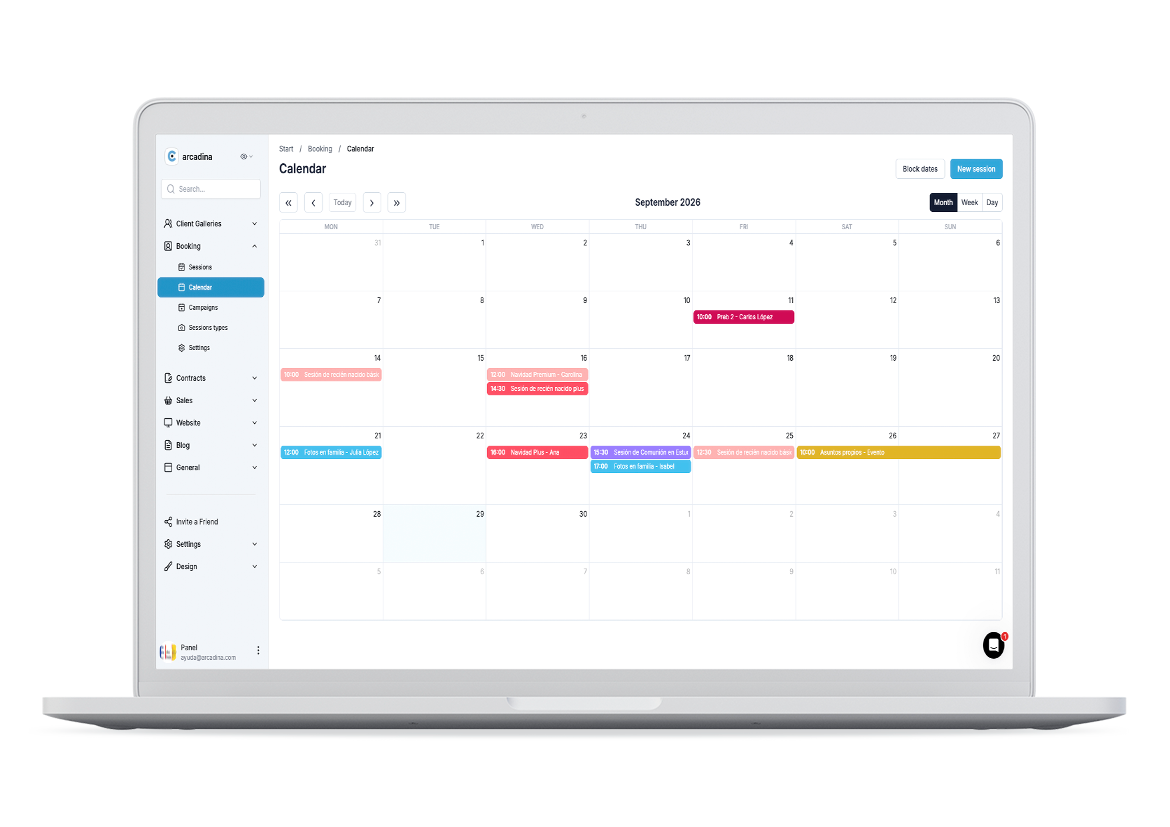
When you have several photo shoots scheduled, different services available and clients making bookings via your photography website, being able to quickly access the information you need is essential. That’s why a significant part of the Booking improvements for photographers focuses on simplifying the way you manage all those bookings from your dashboard.
We’ve reorganised the different screens so that important information is more visible and common actions are easier to find. The idea is that you can log into Booking and quickly see what’s pending, check the details of a session or make any changes you need without having to navigate through different sections.
We’ve also reviewed some of the processes you carry out most frequently. Our aim has been to reduce unnecessary steps and make certain actions much more straightforward. This simplification is particularly useful during busy periods, such as the Christmas season, communions, school photo sessions or any time of year when you have a large number of bookings concentrated into just a few weeks.
Because when your diary starts to fill up, every minute you save on administrative tasks counts. And that’s precisely where we want ‘Booking for Photographers’ to help you: by centralising information and making the day-to-day management of your photography session bookings increasingly convenient.
New Booking screens designed for your day-to-day work
One of the most noticeable aspects of this revamp is the Booking screens themselves. We’ve updated all the sections, and they now have a clearer structure that’s more consistent with the rest of the new Management Dashboard. The aim has always been to enable you to quickly identify the most important information and intuitively find the actions you need to carry out. But behind these visual changes lies a functional overhaul as well. That’s why we’ve taken advantage of the update to each screen to analyse in detail how tasks are carried out and assess which processes could be simplified.
This means that, in certain cases, you’ll not only find revamped screens, but also a more convenient way of carrying out actions that were already part of Booking. And this is precisely one of the main aims of the revamp: to enable you to spend less time figuring out where each option is and more time managing your business.
Booking Sessions
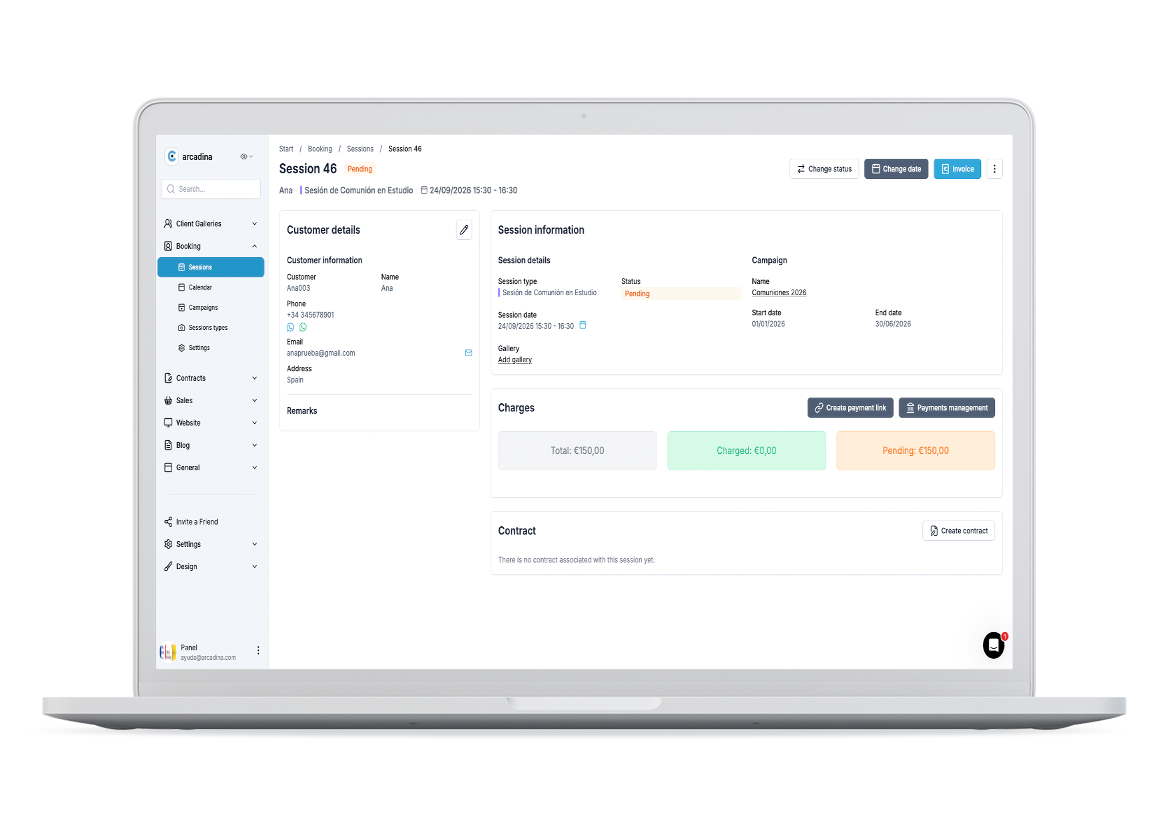
The Booking sessions homepage has changed significantly. Now, when you access this section, you’ll find the basic information about your customers’ bookings presented in a much clearer and more organised way, in line with the new design we’re gradually rolling out across the Arcadina Management Panel.
This way, you can view your upcoming sessions and quickly find the information you need to manage each one. Furthermore, when you view a specific booking, you’ll find all the information organised into different sections:
- Client details.
- Session information.
- Payments.
- Contract.
This new layout will give you a much clearer overview of each booking and allow you to quickly access the details you need to view or edit. You’ll also find various buttons that let you carry out some of the most common actions related to a session, such as changing its status or date, invoicing, creating a payment link, managing payments or creating a contract.
The aim of this update is to enable you to carry out most of the tasks related to each booking from a single place, avoiding unnecessary steps and making it much easier to keep track of your sessions.
Booking Calendar
In the booking calendar section, although at first glance it may seem that there are no major changes in terms of functionality, the truth is that the redesign makes the user experience much clearer and more up-to-date. The new look is fully integrated with the design we are incorporating into the Management Panel, thus achieving more consistent navigation between the different tools.
From this calendar, you can continue to carry out all the usual tasks to organise your photo shoot bookings. For example, you can block off dates when you do not wish to receive bookings, manually add a new session, or view your schedule using the various calendar views available. All these options retain their functionality, but now feature a revamped design that is more seamlessly integrated with the rest of the dashboard, making it easier to view and organise your upcoming sessions.
In addition, we’ve also revised one of the most important processes in this section: synchronisation with external calendars, such as Google Calendar. The process has been simplified to make linking the two calendars easier.
Thanks to this synchronisation, you can keep much better track of your availability and avoid having to check different calendars separately. In this way, Booking continues to help you centralise the organisation of your sessions, but now within a more up-to-date, intuitive and easy-to-manage environment.
Booking Campaigns
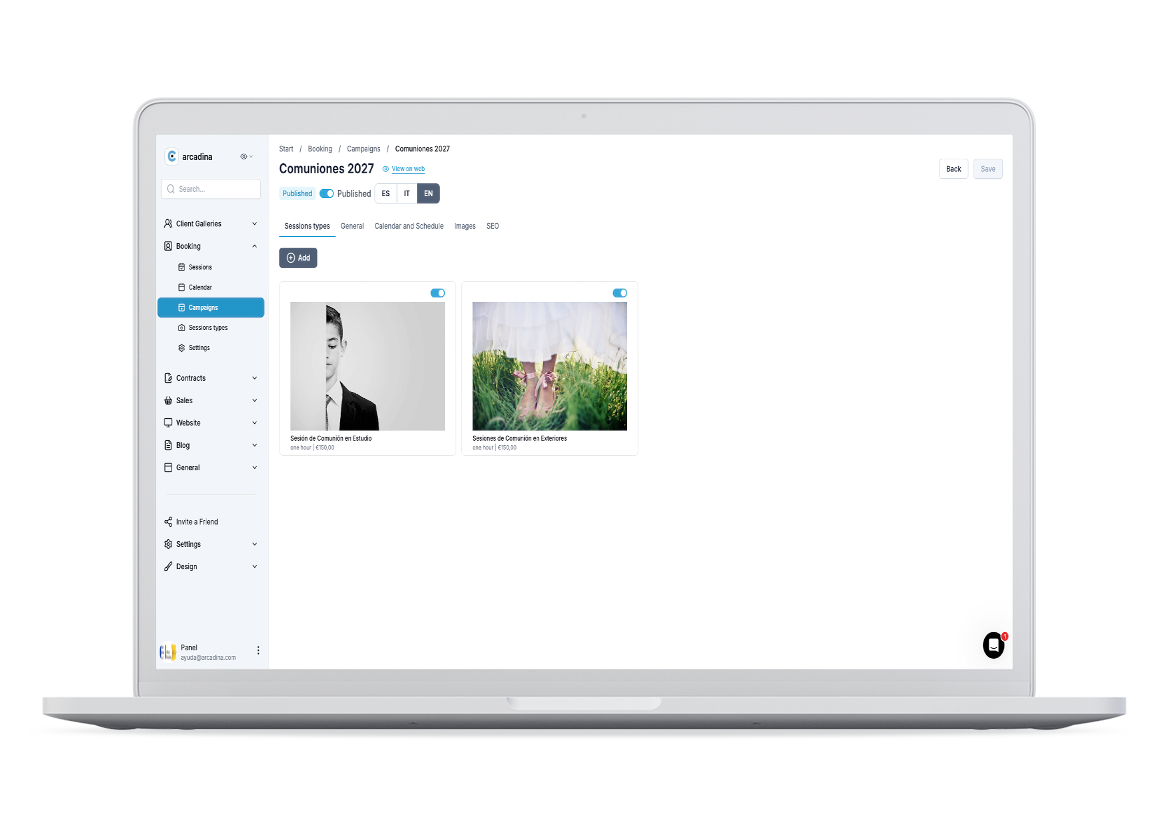
If you go to the Booking campaigns section, one of the first changes you’ll notice is its new design. The main screen now has a much more modern look, in keeping with the rest of the Management Panel, and also allows you to see more details about the campaigns you’ve created at a glance.
But the improvements aren’t limited to the visual aspect. We’ve also overhauled the process for creating a new campaign to make it simpler, more organised and more intuitive.
Now, whenever you want to set up a Booking campaign, all the necessary information is organised into three clearly distinct steps:
- Basic information, where you can define the key details of the campaign.
- Calendar and timetable, to set when your customers can make bookings.
- Images, where you can add the visual content to accompany the campaign.
This new structure allows you to work through the setup step by step and gives you a much clearer idea of what information you need to enter at each stage. Furthermore, when you later access a campaign you’ve already created, you’ll also find its details presented in a much clearer and more organised way , maintaining the same visual style we’re incorporating into the rest of the dashboard.
In short, we’ve revamped both the creation and viewing of campaigns so that preparing, reviewing and managing your upcoming session campaigns is much more convenient.
Session Types
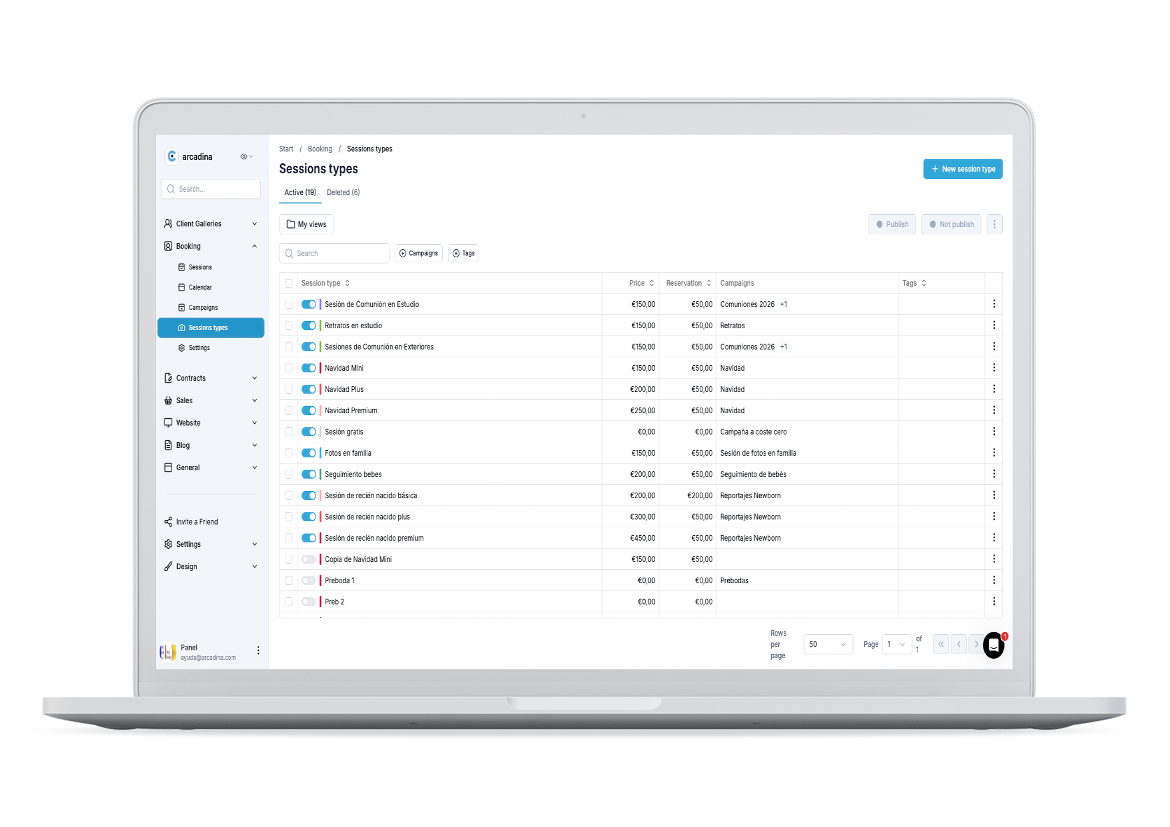
As with campaigns, we have also revamped the ‘Session Types’ section in Booking. All screens now feature a more modern look in line with the new dashboard, but the changes go beyond the visual aspect. The main Session Types screen is now clearer and makes it easier to view the different sessions you have created. Furthermore, we have completely reorganised the process for creating a new session type, dividing the entire setup into four steps:
- Basic Information, where you can define the key details of the session type.
- Time and Confirmation, to configure aspects relating to the session’s duration and booking.
- Images, where you can add the visual content you’ll use to present this service to your customers.
- Products and services, to configure the options relating to what you’ll be offering in this type of session.
Thanks to this new layout, you will no longer have to configure all the elements of a session from a single screen. You’ll be able to proceed step by step and focus on each group of options in a much more organised way. Furthermore, when you access one of the session types you’ve already created, you’ll find all the information presented in line with the panel’s new structure and design.
With these changes, we aim to make creating, reviewing or modifying your session types much more intuitive, so you can get your Booking services ready more quickly and in a more organised way.
Booking Settings
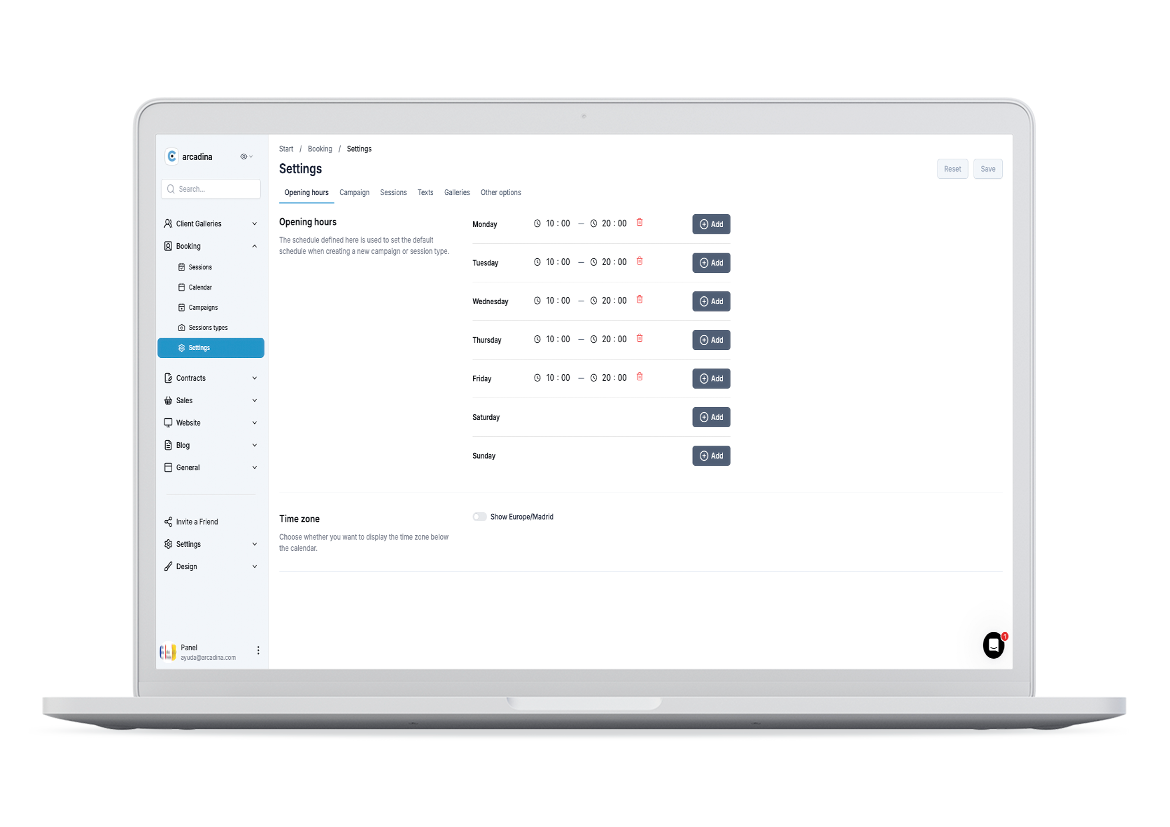
The Booking Settings section has also been revamped, both visually and functionally. To begin with, the settings sub-menu, which previously appeared on the side, is now located at the top of the screen. This change provides more space to display the various parameters and to view and configure the options more conveniently. In addition to this visual revamp, we’ve added some particularly useful new options to customise how your bookings work.
One of these is the ‘Interval between sessions’, a new setting that allows you to select the time intervals in which available booking slots will be displayed. This gives you greater control over how your availability is presented to customers when they’re choosing an appointment. You’ll also find that the option relating to Taxes has been moved; from here, you can select which type of tax you wish to apply to the invoices you issue for your Booking sessions.
Another new feature relates to communication with your clients. You’ll now have more predefined texts that you can customise, including the messages clients receive when they make a new booking, whether payment is made online or offline. Finally, you’ll also be able to customise the message that appears in the shopping basket, tailoring it to the information you want to show your clients during the booking process.
With these new options, Booking’s settings give you greater control over key aspects of your bookings, from how you display your availability to invoicing and the communications your customers receive.
Centralise your photo shoot bookings on Booking
One of the great benefits of managing your bookings with Booking is being able to organise all your photo shoot bookings in one place. Your clients can browse the services you offer, check your available dates and times, and book online. But we know that not all bookings necessarily come through your website.
A regular client might message you directly on WhatsApp, you might receive a phone call, or you might book a session in person. In these cases, you can also add these bookings to Booking to keep your diary organised and avoid having information scattered across different apps, conversations or notes. This way, you can view upcoming sessions from the management dashboard and access the details of each booking whenever you need them.
With the improvements we’re making, we want to make all this management even simpler. We want you to be able to quickly locate a session, check its details and carry out the necessary actions via an increasingly user-friendly interface. Because Booking isn’t intended to replace the personal relationship you have with your clients. Its purpose is to help you reduce the administrative tasks behind each session so that you can focus your time on offering them a better experience.
Booking integrates with the overall management of your photography business
A booking isn’t a one-off process. In many cases, it’s just the start of your relationship with your client.
First, someone might discover your work via your website. They then browse the sessions you offer, select an available date and make a booking. From there, a whole workflow begins, which may continue with client management, payment, signing a contract, carrying out the session, delivering the photographs and the corresponding invoicing. That’s why Booking makes even more sense when it forms part of a suite of interconnected tools.
Website → booking → client → payment → contract → session → delivery of photographs → invoicing.
At Arcadina, we want to continue moving precisely in this direction. It’s not about offering you lots of standalone tools, but about enabling you to manage more and more of your business tasks from a single platform and making it easy to move from one process to the next.
The revamp of Booking and the rest of the Management Dashboard is also in line with this philosophy. We’re working to create a more consistent experience across the different solutions and to ensure the information you need is accessible when you actually need it. The result is a working environment designed specifically for the day-to-day life of a professional photographer.
Save time by automating your session bookings
One of the main advantages of using Booking for photographers is that it reduces much of the manual work traditionally involved in booking a session. When a client can browse your services, check your availability and directly select a date and time, many of the usual messages trying to coordinate schedules disappear.
This can be particularly handy when you run sessions with a pre-defined structure and duration: Christmas, first communions, children’s photography, newborn photography, family sessions, corporate portraits or any other service you can organise using time slots.
But automation doesn’t end when the client confirms their booking. You then need to have all that information organised to prepare for the session and continue working with that client. That’s why we’re paying special attention to both the client’s experience when booking and your own when you subsequently access the Management Dashboard.
We want both processes to be straightforward.
Your client needs to be able to book hassle-free, and you need to have the necessary information to manage that session without wasting time searching for details or carrying out repetitive tasks. And it is precisely this combination of automation and straightforward follow-up management that makes Booking a particularly useful tool for organising the day-to-day running of a photography business.
And if you want to go one step further and find out how to set it up and make the most of all these features, in this article we explain how to get the most out of your booking calendar for photographers.
>> Booking calendar for photographers: how to get the most out of it
We’re continuing to improve the Arcadina Management Dashboard
The improvements we’ve made to Booking are part of a much broader project to revamp the Arcadina Management Panel. Our aim is to progressively review the different screens, reorganise the information and simplify those processes that can be carried out more quickly and intuitively. And this means that Booking will continue to evolve.
As we roll out new improvements, we want managing your sessions to require less and less administrative effort. Not because the tasks needed to run a business will disappear, but because many of them can be automated or carried out much more easily. We’re also working to ensure that the various tools you use in Arcadina offer a more consistent user experience. This way, once you’ve got to grips with the dashboard’s new layout, you’ll find it easier to switch between Booking and the rest of your business’s solutions.
Behind every new screen, every simplified process and every option we reorganise, there is therefore a single goal: to help you save time when managing your photography business. Because you can use that time to prepare your sessions better, look after your clients, improve your strategy or, quite simply, spend more time taking photographs.
Discover all the features Booking has to offer photographers
If you’re already using Booking for Photographers, we recommend logging into your Management Dashboard to explore the new screens and improvements we’ve been rolling out. And if you’re still managing many of your bookings manually, now might be a good time to discover everything Arcadina’s booking calendar can do for your business.
You can create the different types of sessions you offer, organise your availability, allow your clients to book online, keep track of your schedule, create invoices, assign galleries, and more. What’s more, you can also centralise any bookings you receive through other channels to get a more comprehensive overview of your upcoming sessions.
In the meantime, we’ll continue working every day to make Booking for Photographers even easier to use and even better integrated with the rest of Arcadina’s tools. Because whilst automating bookings is important, doing so within an environment specifically designed for the needs of a professional photographer can help you simplify the day-to-day management of your business even further.
What do you think of all these improvements to Booking for Photographers, and what other new features would you like us to add to make managing your bookings even easier? We’d love to hear from you in the comments.
Arcadina goes with you
Fulfil your dreams and develop your career with us. We offer you to try our web service free for 14 days. And with no commitment of permanence.
Arcadina is much more than a website, it is business solutions for photographers.
If you have any queries, our Customer Service Team is always ready to help you 24 hours a day, 7 days a week. We listen to you.
Free trial · No card · No lock-in
Build your photography business online
Sales with no commission · Everything in one plan · 30-day free trial, no card