How to sell digital photos: pricing by size and license
Selling digital files is one of the most profitable sales a photographer can make: there are no printing or shipping costs, and the client gets the photo instantly. But if you charge the same for a photo a grandmother wants for her phone as for a photo a company will use on its website or in an ad campaign, you are either leaving money on the table… or scaring off the client who only wanted something small.
The solution is to price your digital photos by size and by usage license. In this guide we explain how to approach it, which sizes and licenses to offer, how to build your price list for your type of photography, and the mistakes to avoid.
Why you shouldn’t charge the same for every digital file
A digital file isn’t worth the same to every client. Its value depends on two things:
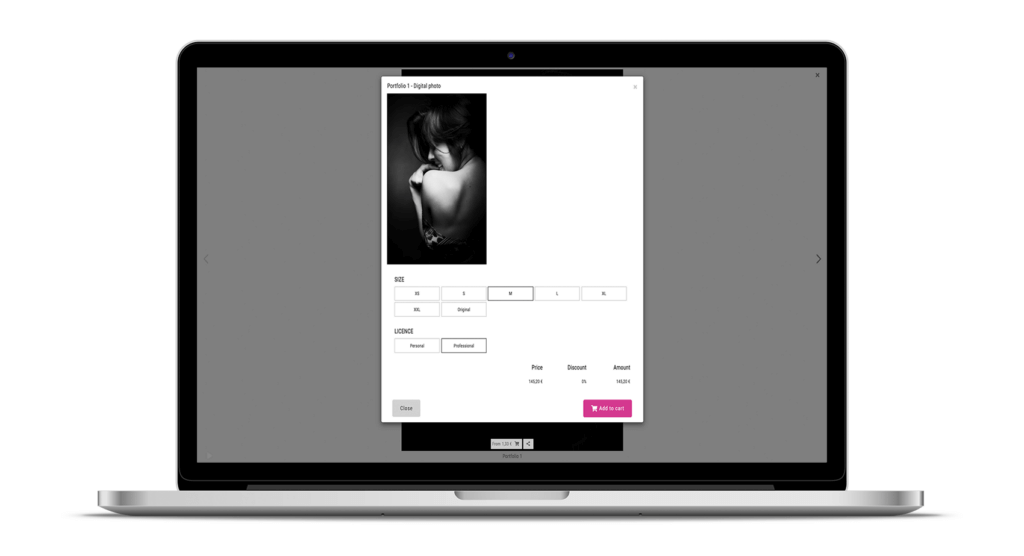
- Size (resolution), which determines what it can be used for: a photo for social media or a screen doesn’t need the resolution of a wall print or an album page.
- License (usage), which determines who uses it and why: a family sharing a photo with friends is not the same as a brand using it to sell.
When you offer several options, each client chooses what they need and pays for what they will actually use. And your average order value goes up: clients who start with the small version often end up buying the high-resolution one too.
Which sizes to offer
Keep it simple. Three sizes cover almost every case:
- Small (web and social media): enough for phones, messaging apps or Instagram. This is your entry option and the cheapest one.
- Medium (home printing): for standard-size prints or a small framed photo.
- Original / high resolution: the full file, for albums, enlargements or any demanding use. It has the most value, so it should be your most expensive option (or included only in your top packages).
Tip: use the small size as a low-priced “hook” and keep the original as the premium option.
Personal vs. commercial license: what’s the difference?
The license defines what the client can do with the photo they buy. The most practical approach is to work with two:
- Personal license: private use by the client. They can keep it, share it on their personal social media and print it for home, but not use it for commercial purposes.
- Commercial (professional) license: use by a business or professional, for example on their website, company social media, advertising, catalogues or press. Since the photo will help them make money, it costs more.
Always put in writing what each license includes, on the product page or in your terms of sale. If you shoot commissions for businesses, ideally include it in the session contract. If you don’t have a template yet, here’s how to manage your contracts for photographers.
How to build your price list: three approaches
1. Price by size, with a single license
The simplest option and the one that works best with private clients: families, weddings, first communions, private events. Everyone buys with a personal license and only chooses the size.
2. Price by license, for several sizes
Designed for corporate, product, nature or stock photography, where the same file may be bought by an individual or by a company. The commercial license usually costs several times the personal one.
3. Price according to the package the client booked
Very useful if you sell sessions in packages. For example, a newborn photographer with two packages: clients on the basic package buy their digital files at the regular price, while clients on the full package (with an album) get them at a reduced price. You reward those who invest more and give everyone a reason to upgrade.
Examples by type of photography
- Weddings: the selected photos are included in the package, and you sell extra photos and high-resolution files for relatives separately. Personal license.
- Children, newborn and first communion: a low-priced small size to share with family, and a more expensive original, or one included in the top packages.
- Events and corporate: commercial license for companies and organisers, priced per photo or per batch. If you also sell to attendees, offer them a personal license.
- Sports: lots of buyers and per-photo sales. Keep small sizes affordable and enable instant download after payment so you don’t lose the impulse purchase.
- Nature and stock: both licenses, with the commercial one well above the personal one.
Common mistakes when selling digital files
- One price for everything: it ends up too expensive for individuals or too cheap for businesses.
- Not explaining the license: if you don’t say it, the client will assume they can use the photo for anything.
- Too many options: three sizes and two licenses are enough. More choices confuse buyers and slow down the purchase.
- Giving away the original in the delivery gallery and then trying to sell sizes or licenses: decide beforehand what is included in the session and what is sold separately.
- Not thinking about prints: if the high-resolution file costs less than a printed copy, many clients will print it themselves. Make that your decision, not an oversight.
How to sell digital files by size and license with Arcadina
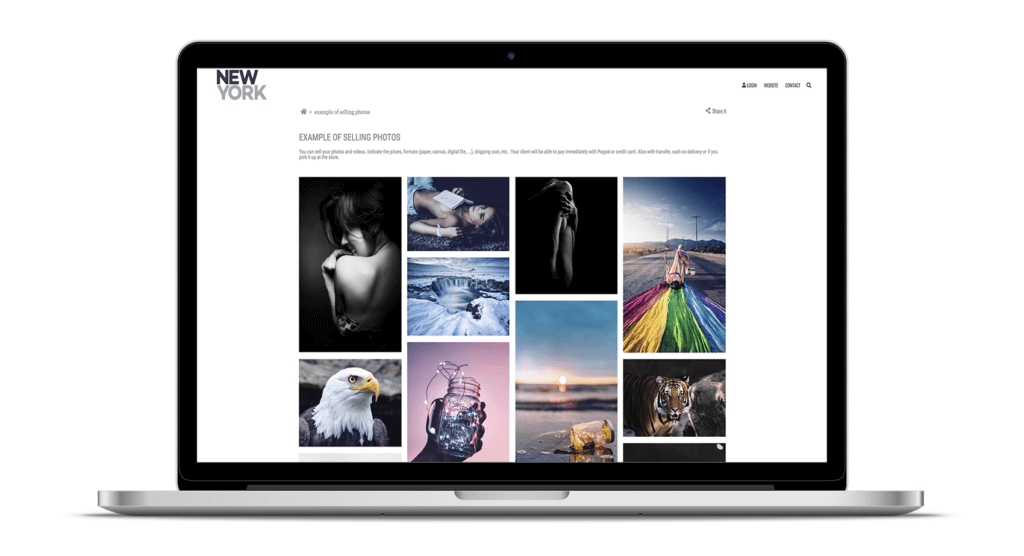
With Arcadina you can sell your digital files from your clients’ private galleries and from your online shop, with automatic payment and download and no commission on your sales. The process is:
- Enable the Digital photo format (and, if you like, Digital video) in your dashboard.
- Create your price lists: by size (with a fixed license) or by license (for a set of sizes), using the personal and professional licenses.
- Assign the right price list to each gallery.
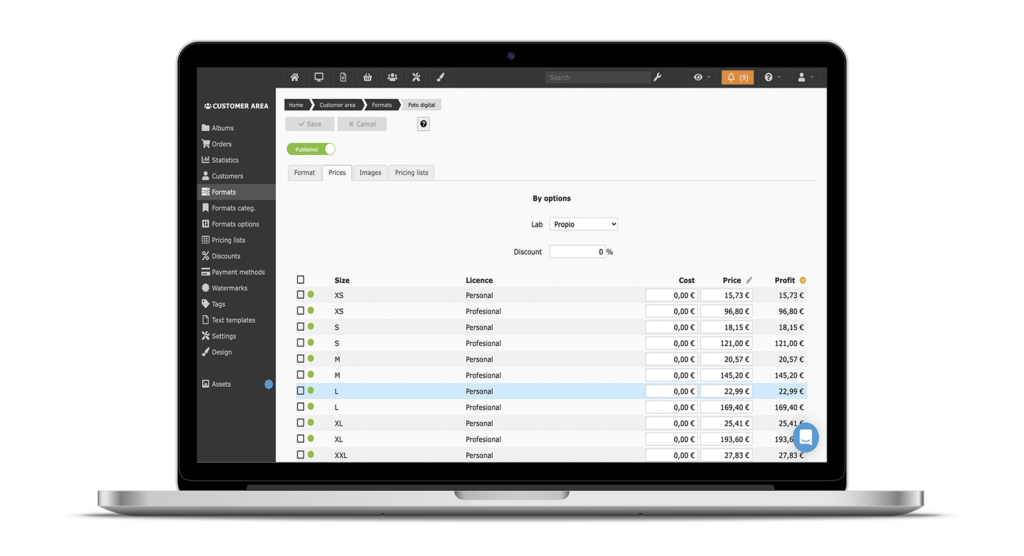
You’ll find the steps in our help center: Client gallery – Price lists and Client gallery – Create a digital sales gallery. And if you need a hand setting up your first price list, our customer service team will help you.
And to see everything you can sell from your website (digital files, prints, photo products and services), take a look at selling photos, videos and photography services with Arcadina. If you’re not yet selling commission-free, you’ll also like this article: how to sell your photos on your photo website without paying commissions.
Frequently asked questions
Can I sell the same file with different licenses?
Yes. That’s exactly what a price list by license does: the same file is offered with a personal and a professional license, each with its own price.
What if a private client later needs commercial use?
Offer them an upgrade to the commercial license for the difference in price. That’s why the license should always be in writing: you both know what was bought.
Do I always have to deliver the original file?
No. You decide which sizes you offer and at what price. Many photographers keep the original for their top packages or sell it as a premium option.
Free trial · No card · No lock-in
Build your photography business online
Sales with no commission · Everything in one plan · 30-day free trial, no card