How can you get the most out of WhatsApp Business?
Adding WhatsApp to a website is one of the simplest ways to make it easier for your clients to contact you. Instead of searching for your phone number, copying it or filling in a form, they’ll be able to start a conversation in a matter of seconds from any device. A small change that can improve the user experience and help you avoid missing out on business opportunities.
If you’re a professional photographer, this WhatsApp integration is particularly useful. Many enquiries come in when a client is comparing different professionals and needs to quickly clarify a query about a shoot, request a quote or check your availability. The easier it is for them to get in touch with you, the greater the chances of turning that visit into a booking. In this article, you’ll discover why it’s worth adding WhatsApp to a website, what benefits WhatsApp Business offers, how to set up this tool correctly, and what you need to bear in mind to make the most of its potential for your photography business.

The fewer steps a client has to take to contact you, the greater the chances of turning a simple visit to your website into a new photo shoot.
Why add WhatsApp to a website?

More and more users prefer to communicate via messaging apps rather than making a phone call or sending an email. WhatsApp has become one of the most widely used communication channels in the world, and offering this option on your website can make all the difference when it comes to attracting new customers.
Adding WhatsApp to a website not only makes it easier to get in touch, but also breaks down the barriers between visitors and your business. Instead of having to search for a phone number or fill in a form, users can start a conversation straight away and get their queries sorted in a matter of seconds. This speed creates a more convenient and personal experience, especially in a sector such as photography, where trust and personalised service are essential.
Below, we outline some of the key benefits of integrating WhatsApp into your website.
It makes initial contact easier
Many potential clients visit a website with specific questions before booking a photo shoot. They may want to check availability for a particular date, request information about a photo shoot, or ask what a specific service includes. If the process for getting in touch is complicated, they may leave the site and continue looking for other options.
With a direct link to WhatsApp on your photography website, visitors can start a conversation with a single click, without having to copy phone numbers or switch between apps. The easier it is to get in touch with you, the greater the chances of starting a conversation that leads to a booking.
Address your clients’ queries
Before making a decision, clients often want to clarify minor queries about prices, locations, the duration of the session or how the photographs will be delivered. Having a fast communication channel allows them to get answers almost instantly and proceed with the booking process with greater confidence.
What’s more, a conversation on WhatsApp tends to feel more personal and natural than an email exchange, which helps build a better relationship from the very first contact and conveys an image of greater availability and professionalism.
Generate more sales opportunities
Every conversation initiated via your photography website represents an opportunity to secure a new client. Although not every enquiry will result in a booking, making it easy to get in touch significantly increases the chances of establishing a business relationship.
For a photography studio, WhatsApp can be the perfect channel for informing clients about promotions, explaining the different types of photo sessions, addressing any concerns, or helping clients choose the service that best suits their needs. A quick and personalised response can be the deciding factor that tips the balance in your favour over other photographers.
Offer faster, more personalised service
The speed with which you respond also influences customers’ perception of your business. Being able to start a conversation via WhatsApp conveys a sense of personal connection and makes the customer feel as though they are speaking directly to the person who will be carrying out their photo shoot.
This is particularly useful during peak periods, such as First Communion, wedding, Christmas or family photo shoot campaigns, when it’s common to receive numerous enquiries every day. Having a direct channel of communication will allow you to deal with them more efficiently and offer a much more satisfying experience right from the start.
Why use WhatsApp Business instead of WhatsApp?
Although WhatsApp and WhatsApp Business share many features, the latter has been specifically designed for businesses and professionals. If you use your website to attract new clients, WhatsApp Business will help you provide a more organised, professional and efficient service.
Unlike the personal app, WhatsApp Business allows you to create a business profile with useful information such as opening hours, address, website or a description of your services. It also includes tools to set up automatic welcome and away messages, create quick replies for the most common enquiries, and organise conversations using labels.
Another advantage is the ability to display a catalogue of your services, making it easier for customers to find out what you offer even before they start a conversation. It also includes basic statistics on messages sent and received, which can help you improve the service you provide.
For a professional photographer, these features are particularly useful. Many enquiries are similar: availability, prices, type of session or turnaround times. Thanks to WhatsApp Business, you’ll be able to respond more quickly, keep all your conversations organised and project a much more professional image from the very first point of contact.
If you also integrate WhatsApp Business into your website, you’ll make it easier for visitors to contact you with a single click, reducing communication barriers and increasing the chances of turning a simple enquiry into a new booking.
Benefits of adding WhatsApp to a photography website

In photography, every enquiry can lead to a new shoot, a wedding or a client who’ll come back to you in the future. That’s why making it easy for people to get in touch via your website can make all the difference. By adding WhatsApp to a photography website, you’re offering a fast, direct and familiar communication channel for most users, enhancing their experience right from the start.
Here are some of the key benefits this can bring to your business.
Respond quickly to enquiries about photo shoots
Many clients visit a website with specific queries before making a decision: they want to know if you have a date available, how long a session lasts, what’s included in a photo shoot, or when they’ll receive the photographs.
If they can get these questions answered via WhatsApp in just a few minutes, they’ll be much more likely to proceed with the booking process. A quick response conveys professionalism, builds trust and prevents the client from leaving your website to look for another photographer.
Make it easier to book new photo shoots
Getting in touch with you should be a straightforward process. The fewer steps a visitor has to take to message you, the more likely they are to end up requesting information or booking a session.
A direct link to WhatsApp removes barriers such as copying a phone number, switching apps or filling in a form. With just one click, the client can start the conversation and begin organising their wedding, communion, newborn, corporate photography or any other service you offer.
Support the client throughout the process
Communication with a client doesn’t end when they confirm a booking. Before the session, questions may arise about the location, outfits or the necessary documentation. Afterwards, it’s common for them to want to know the status of the editing, clarify any queries about the delivery of the photographs or request additional products.
WhatsApp makes it easy to maintain close communication throughout the process, offering a more personalised service and enhancing the client’s experience from the first point of contact right through to the final delivery.
Enhance your business’s image
A modern website should make it easy for visitors to find the information they need and to contact the professional easily. Integrating WhatsApp Business conveys approachability, availability and a greater focus on the customer.
If you also combine this channel with other tools such as a contact form, an online booking system or private galleries for delivering photographs, you’ll offer a much more comprehensive and professional experience. All of this will help create a better impression of your studio and increase the chances of converting visits to your website into new clients.
How to add WhatsApp to a website
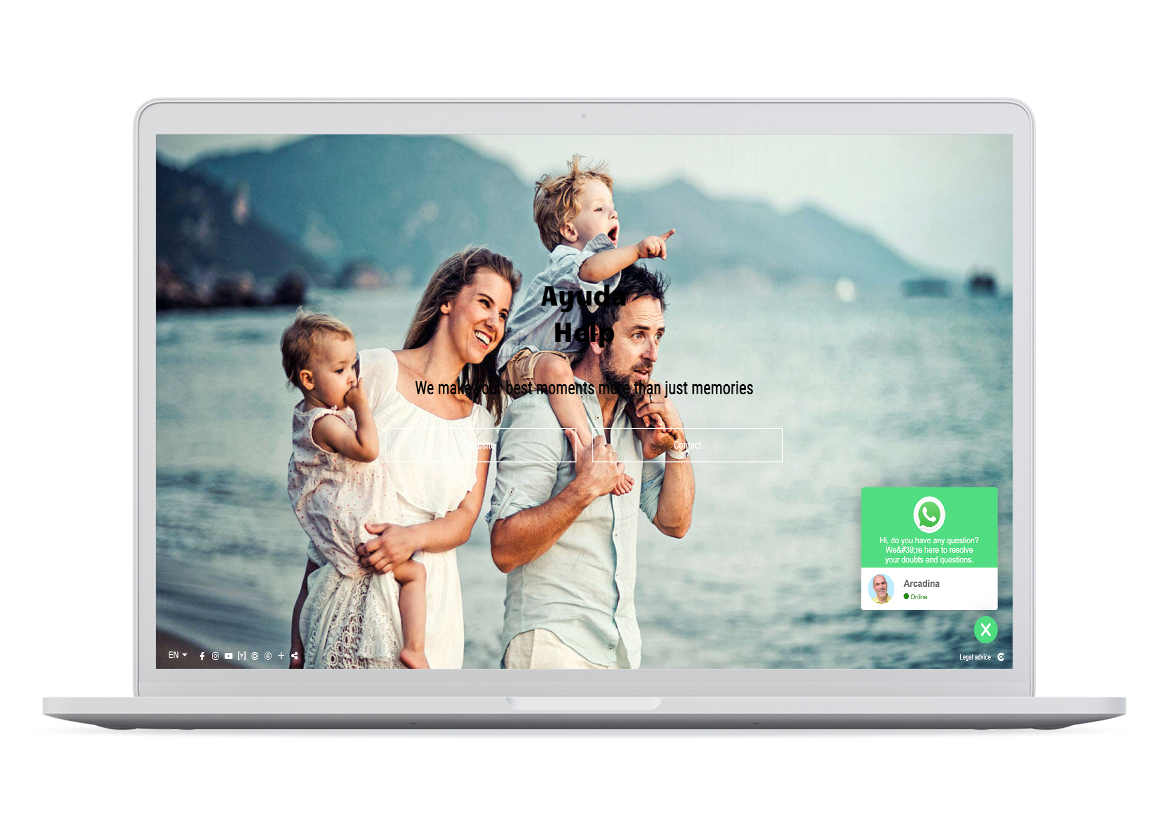
If you want to offer your clients a fast and direct channel of communication, integrating WhatsApp into your website is one of the best options. With Arcadina, you don’t need to install plugins, modify your website’s code or use external tools. The integration is designed so that you can easily activate and customise it from your control panel.
You can tailor the widget to your business’s branding by changing the icon, background colour, button text, welcome message and where it appears on the screen. Furthermore, if your website is available in several languages, you can configure these texts for each one.
Another advantage of this integration is the ability to set up to two support agents. This option is particularly useful for studios where several photographers work or where there is a designated person responsible for handling enquiries. Each agent can have their own name, photograph and telephone number so that customers can contact the right person directly.
Once activated, the widget will be available on most pages of your website, making it easy for visitors to start a conversation with a single click. This will allow you to offer a more personalised service, resolve queries more quickly and increase the chances of turning a visit to your website into a new photo shoot.
If you’d like to find out all the steps to activate and configure this integration, you can consult the Arcadina Help guide, where you’ll find detailed instructions on how to customise the service to suit your business’s needs.
Tips for getting the most out of WhatsApp Business

Adding WhatsApp to your website is just the first step. For this tool to really help you attract more customers and improve the service you offer, it’s important to use it strategically. Fast, organised and professional communication can make the difference between a simple enquiry and a new booking.
These tips will help you harness the full potential of WhatsApp Business for your photography business.
Reply as soon as possible
When a client starts a conversation, they’re usually comparing different options. If they receive a quick reply, they’re more likely to continue the process with you. If, on the other hand, several hours or even days go by without a reply, they’re likely to end up hiring another photographer.
If you can’t reply straight away because you’re in the middle of a shoot or a photo session, set up an automatic message to let them know you’ve received their enquiry and that you’ll get back to them as soon as possible.
Use WhatsApp to complement your website
WhatsApp is an excellent tool for maintaining quick and personal communication with your clients, but it shouldn’t replace the other features on your website. Each tool serves a different purpose and, when used together, they offer a much more comprehensive experience.
For example, you can use WhatsApp to answer quick enquiries, whilst contact forms allow you to gather more detailed information, the online booking system makes it easier to book sessions, and private galleries simplify the delivery of photographs. In this way, your website becomes the hub of your business and WhatsApp acts as a communication channel that streamlines contact with your clients.
Prioritise your customers’ experience
Not every conversation needs to be about making a sale. Kindly answering a query, providing an update on the progress of a photo shoot, or thanking a client for their trust are all part of good customer service.
A friendly, professional and personalised approach to communication helps build trust, improves the customer experience and increases the likelihood that they will use your services again or recommend you to others.
Mistakes to avoid when adding WhatsApp to a website

Adding WhatsApp to your website can help you improve communication with your customers and increase business opportunities. However, for this tool to be truly effective, it’s best to avoid certain mistakes that could harm the user experience or cause you to miss out on potential bookings.
One of the most common mistakes is taking too long to reply. Many people use WhatsApp because they expect a quick response. If you cannot reply straight away because you are in a session or working outside the studio, use a welcome or away message to let them know you will reply as soon as possible.
It’s also important to keep the WhatsApp button visible and accessible at all times. If a visitor struggles to find a way to contact you, they may leave the page without making an enquiry. Making it easy to get in touch at any stage of their browsing journey improves the user experience and boosts conversion rates.
Another common mistake is using WhatsApp as the sole communication channel. Some clients may prefer to get in touch via a contact form, book a session online or contact you by email. Offering a range of options allows you to cater to each person’s preferences and project a more professional image.
Finally, check your WhatsApp Business profile and the integration regularly. Keep your business details up to date and check that the button works correctly on both computers and mobile devices. These small details build trust and help to provide a more polished experience from the very first point of contact.
How to combine WhatsApp with other tools to deliver a better experience
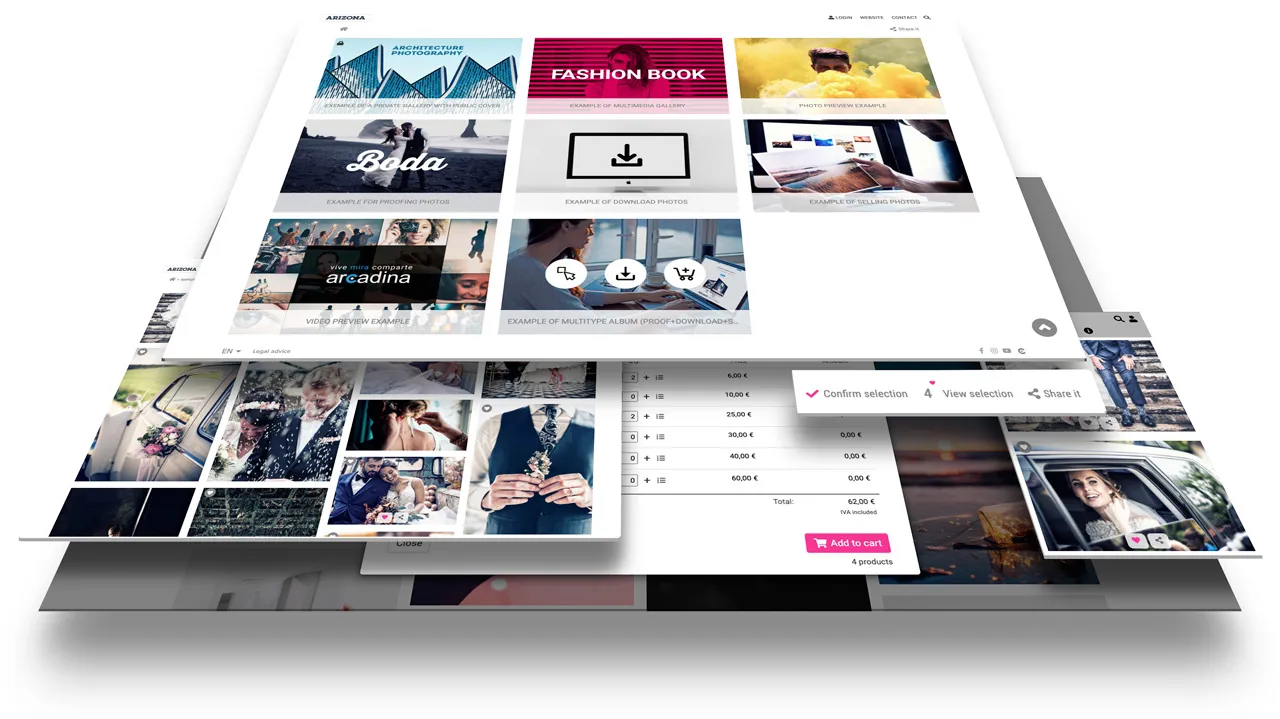
WhatsApp is an excellent tool for answering queries and maintaining quick communication with your customers, but its true potential is realised when it’s integrated with the rest of your business’s services. Rather than managing everything from a single app, it’s best for each tool to fulfil a specific role within the booking process.
For example, you can use WhatsApp to answer quick queries or resolve any concerns before a booking, whilst the contact forms on your photography website will allow you to gather more detailed information about the type of session each client requires. If you offer online bookings, your clients will be able to choose from available dates and times without having to exchange multiple messages.
Once the session is confirmed, tools such as online-signed contracts help to formalise the service quickly and securely. And when the work is complete, private galleries allow you to deliver the photographs, select favourite images, download the files or place orders for prints without having to rely on WhatsApp for every step.
>> Arcadina’s contracts and bookings are now integrated!
In this way, WhatsApp becomes a streamlined communication channel that supports the client throughout the entire process, whilst the other tools automate administrative tasks and enhance the customer experience. The result is a much more organised workflow, a more professional service and more time to devote to what really matters: taking photographs.
Start adding WhatsApp to your website today
Adding WhatsApp to a website is one of the simplest ways to improve communication with your clients. It makes initial contact easier, allows queries to be resolved immediately and removes barriers that can often cause a potential client to leave your site without even requesting information.
If you also use a platform such as Arcadina, you can seamlessly integrate WhatsApp Business into your website and combine it with other tools designed for photographers, such as online bookings, contact forms, quotes, digitally signed contracts or private galleries. This way, you’ll offer a much more convenient and professional experience throughout the entire process, from the initial enquiry right through to the delivery of the photographs.
If you haven’t yet added WhatsApp to your website, now is a good time to do so. It’s a small improvement that can help you provide a more personalised service, build greater trust and increase your chances of turning website visitors into new clients.
Do you already use WhatsApp Business on your website? Tell us about your experience or share in the comments how this tool has worked for your photography business.
Arcadina goes with you
Fulfil your dreams and develop your career with us. We offer you to try our web service free for 30 days. And with no commitment of permanence.
Arcadina is much more than a website, it is business solutions for photographers.
If you have any queries, our Customer Service Team is always ready to help you 24 hours a day, 7 days a week. We listen to you.
Free trial · No card · No lock-in
Build your photography business online
Sales with no commission · Everything in one plan · 30-day free trial, no card