Photo session contract: sample agreement and essential clauses
A family books a session and, when they receive their gallery, asks why they cannot download every image. A couple assumes their wedding album was included in the price. Another client expects to reschedule without notice. These are different situations, but they have something in common: the service terms were not clear enough.
Preparing a photo session contract helps you explain what you offer, how much it costs, and how you will deliver the finished work. It also lets clients know what to expect before confirming their session. Putting the agreement in writing gives both sides peace of mind and reduces misunderstandings that can take time to resolve later.
With Arcadina’s contracts for photographers, you can put those terms into a document your clients can review and sign online. The agreement becomes part of how you organize your business from the beginning of each client relationship.
This guide covers the main clauses to review, a sample agreement you can adapt, and examples for weddings, family portraits, newborn sessions, and First Communion photography. We will also look at managing your contracts in Arcadina and connecting them with bookings.
Before using any template, adapt it to your services and ask a qualified professional to review it under the laws that apply where you work. Cancellation terms, consumer rights, personal information, and image use need particular attention. A template helps you organize the details; professional review helps ensure the agreement fits your business and booking process.

“A clear photo session contract is the first step toward helping you and your clients enjoy the session with peace of mind.”
What to include in a photo session contract

A good photo session contract should let someone outside your studio understand the assignment without reading earlier messages. Start by identifying the photographer or business and the person booking the service: names, any necessary identifying details, addresses, and contact information. If someone is signing on behalf of another person, explain their role.
Next, describe the session: photography type, date, location, approximate length, and expected participants. If the package includes multiple appointments, such as an engagement session and wedding coverage, list each one. You can also attach the accepted quote, clearly identifying which version forms part of the agreement.
Your photo session contract should cover these areas:
- Services and products included.
- Photo selection, editing, and delivery.
- Total price, initial payment, and payment schedule.
- Cancellations, rescheduling, and unexpected events.
- Image use and any required permissions.
- Information about how personal data is handled.
- Acceptance of the terms and signatures.
Keep the information consistent across your quote, booking page, and contract. If a package advertises twenty edited photos, the agreement should not say fifteen or leave the number open. Consistency makes booking easier and helps avoid disputes about differences between what you offered and what you delivered.
Finally, write your photo session contract in plain language. Phrases like “full coverage” or “delivered soon” leave too much room for interpretation. Replace them with terms the client can understand and check. Before sending the agreement, consider the questions clients ask most often: they usually point to areas that need a clearer explanation.
Services, included photos, and delivery times
When clients book a session, they want to know what they will receive and when they can enjoy their photos. This part of the contract should answer simple questions: How many images are included? Who chooses them? Will they receive digital files only, or an album too?
Imagine you offer a family session with twenty photos. If you later show sixty images in the gallery so the family can choose their favorites, explain beforehand that the price includes twenty and that additional images can be purchased separately. This small detail can prevent an uncomfortable conversation when the work is finished.
Explain how you will deliver the photos and what editing is included. You do not need complicated terminology: say that clients will receive their selected, edited images ready to download, and clarify whether prints or other products are part of the package.
The same applies to deadlines: the easier they are to understand, the better. Instead of writing “delivery in two weeks,” explain when that period starts: after the session, after the client selects their photos, or after they approve the album design. Choose the starting point that matches your workflow.
If an album is included, explain how clients can review the design and when it will be sent to print. That helps them understand which steps depend on you and where you need their feedback before moving forward.
Finally, let clients know how long they have to download their gallery. Our guide to delivering photos to clients shares more ideas for making this stage enjoyable, with clear expectations and no surprises.
Pricing, booking payments, and payment methods
Your photo session contract should clearly state the total cost and when each payment is due. Include any applicable taxes, the initial booking payment, and the remaining balance. If you offer extras, such as travel, additional images, or an album upgrade, explain how they are priced and approved before charging for them.
You can use a straightforward schedule: an initial payment to confirm the booking, followed by one or more payments at specific times. What matters is that the dates or milestones are easy to understand and match the information in your quote.
Calling a payment a “deposit” does not, by itself, explain what happens if the session is canceled. Your photo session contract should explain its purpose, how it is credited toward the total, and how it is handled in the situations covered by the agreement. Avoid copying “nonrefundable under all circumstances” terms without checking whether they are appropriate and enforceable for your business.
It also helps to list the payment methods available and the documents clients will receive. The contract sets out the service agreement; an invoice documents the charge. Keeping them consistent helps you track the descriptions, amounts, and payments associated with each job.
In day-to-day work, organized payment information reduces questions about outstanding balances. If a client asks to expand the service after booking, record the additional work, its price, and their approval. This makes it easier to distinguish the original package from later purchases and prevents an add-on from being mistaken for an included item.
Cancellations, rescheduling, and unexpected events

What if a family needs to change their appointment? What if it rains on the day of an outdoor session? Discussing these situations before booking helps everyone understand what to do if they happen.
Explain how clients should contact you if they cannot attend and how much notice they should give. This might be by email or another channel you use in your studio. The important thing is that they know where to write and that you keep a record of what you agree.
Distinguish between canceling the session and choosing another date. If you allow rescheduling, explain that a new appointment depends on availability. The contract should also state how long clients have to complete the session and what happens to money they have already paid.
For a family beach session, for example, you might explain that if the weather makes the shoot impossible, you will contact the family to agree on another date. This avoids a last-minute decision when the children are ready and everyone is wondering whether to leave home.
Think about what would happen if you were unable to carry out the assignment because of illness or another problem. Explain how you would notify the client and what alternatives you could discuss. The terms should consider both sides.
Have a qualified local professional review your payment, refund, and rescheduling terms. Avoid copying statements such as “the deposit is never refunded” without checking whether they fit your service. Knowing your policy from the start will help you respond calmly when something unexpected happens.
Image rights, photo usage, and personal information
Clients receiving their photos and your studio being able to post those images on social media are two different matters. Explain them separately so nobody is surprised after the session.
Start by describing how the client may use the photos. For a family session, you might agree on personal uses, such as printing images or sharing them with relatives. For a business assignment, specify whether the images will appear on the company’s website, in advertising, or elsewhere.
If you want to show portraits in your portfolio, blog, or Instagram account, check which permissions you need and document them. Signing a photography contract does not automatically give you permission to publish every image. When requesting permission, explain where you want to show the images and why.
With children, pay particular attention to who can give the necessary authorization. Do not assume that the person booking a wedding can authorize promotional use of every guest’s image, either.
Explain who handles personal information, why it is needed, how long it is kept, and how clients can ask questions or exercise any applicable rights. Depending on the circumstances, you may also need to explain who receives the data and the basis for using it. A local professional can help you prepare complete, understandable information.
With Arcadina’s contract management for photographers, you can bring the terms for each session together in one document. Clarify decisions about photo usage before the shoot so they are easier to respect when you deliver or publish the work.
A sample photo session contract to adapt

If you use Arcadina, you can start in Dashboard / Contracts / Templates. Review the templates available in your account or create your own version for the services you offer. Choose wording that fits your business, clients, and local requirements.
A wedding agreement needs different details from a family or newborn session: names, locations, coverage times, albums, prices, and payments all need to match the assignment. Remove irrelevant sections and complete any missing information, including the privacy details appropriate to your business.
You can create a new template and import text from an existing one to adapt it. Review the result carefully rather than assuming that a template is ready to use in every country or for every type of session.
The editor also offers variables, such as the client’s name or event date, to personalize the document. The bracketed fields in the example below are instructions to complete, not dashboard variables. When using the text in Arcadina, replace them with your details or the appropriate variables.
The sample below is a general example prepared for this article. It helps you organize your service terms, but it needs professional review before you send it to a client. Ask a qualified attorney familiar with the laws that apply to your business to review it. The final wording needs to fit your work.
Sample photography contract, part 1: parties, session, delivery, and price
PHOTO SESSION AGREEMENT
Signed in [location] on [date].
PHOTOGRAPHER AND CLIENT DETAILS
Photographer or business: [name, any necessary identification, address, and contact email].
Client: [name, any necessary identification, address, and contact email].
If signing on behalf of another person, specify [who they represent and their authority to do so].
1. The booked session.
The [session type] session will take place on [date] at [location]. It will last approximately [length] and include [participants]. It also includes [additional agreed services]. The accepted quote is [reference and date] and is attached to this agreement.
2. What the price includes.
The client will receive [number] edited photos in [format and size], plus [album, prints, or other products and their specifications]. The images will be selected by [client or photographer] using [selection process]. Included editing covers [plain-language description]. Unedited original files [are / are not] included.
3. Photo delivery.
The selection gallery will be available within [period measured from a specific event]. The client will have [time] to submit their selection through [channel]. Finished images will be delivered through [delivery method] within [period and starting point]. The gallery will remain available for [period]. Albums and prints will follow this schedule: [selection, design approval, and delivery details].
4. Price and payments.
The total price is [amount and currency], including [applicable taxes]. An initial payment of [amount] confirms the booking and is credited toward the total. The remaining [amount] is due [when and how]. Any extras will be quoted and approved before the additional work begins.
Sample photography contract, part 2: changes, usage, privacy, and signatures
5. Cancellations and rescheduling.
To cancel or request another date, the client will contact [person and channel]. The full terms appear in [section or attached document], provided before booking and forming part of this agreement. They must explain what happens if either party cancels, how a new date is chosen, and what refunds or compensation apply, respecting the rights of both parties. Unexpected events will be handled according to [fully developed terms].
6. Photo usage.
The client may use the delivered images for [agreed uses], subject to [details]. Other uses require any necessary permissions. The rights of the photographer and the people shown in the images will be respected.
7. Permission to publish.
Signing this agreement does not give the studio blanket permission to publish portraits for promotional purposes. Where needed, separate authorization will specify which images may be shown, where, why, and under what conditions.
8. Personal information.
The person or business responsible for the data is [name and contact information]. The [section or attached document provided to the client] explains why the information is used, the basis for its use, who receives it where relevant, how long it is kept, and how applicable rights can be exercised. Any additional purpose will be explained and the relevant requirements checked.
9. Acceptance and signatures.
The photographer and client confirm that they have received and reviewed the terms and attached documents. Later changes will be recorded in writing for acceptance.
Photographer’s signature: [signature].
Client’s or representative’s signature: [signature and role].
Date: [date].
How to adapt the contract to each type of photo session
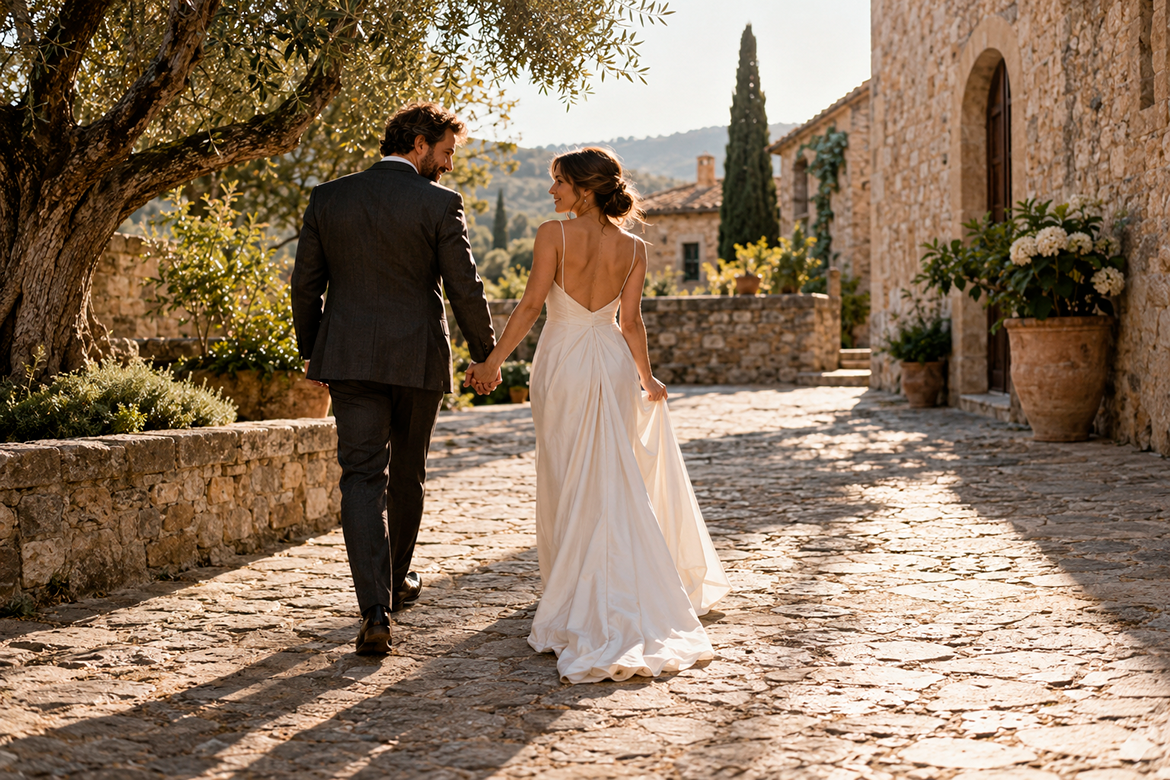
You do not need to start from scratch for every contract, but you do need to make sure it fits the assignment. Weddings, newborn sessions, and First Communion portraits each have different schedules and needs.
Start with a professionally reviewed template and adapt the timing, included images, products, and terms for each service. These examples show which details are worth clarifying in each case.
Wedding photography contracts
There are many moments to photograph and decisions to make before a wedding. Your contract should help the couple understand when you will be there and what their package includes.
State where coverage begins, the start time, and when it ends. If you will photograph getting ready, the ceremony, and part of the reception, put that in writing. Include whether a second photographer will attend and whether video, an engagement session, or a post-wedding session is included.
“Full coverage” can mean different things to different people. You may plan to finish after the first dance while the couple expects you to stay until the celebration ends. Specifying the schedule prevents that mismatch.
For example: “Coverage will begin at [time] at [location] and end at [time or agreed event]. It includes [services]. Any request to extend coverage will be subject to availability and an agreed additional price.”
Your photo session contract should also cover travel and how the couple should notify you of location or schedule changes. If a church or venue has photography rules, find out beforehand and clarify who will arrange any necessary permissions.
For the album, explain how clients will select images, review the design, and receive the finished product. Digital photos and the album may have different delivery dates.
Finally, remember that the couple’s permission does not cover every guest. If you want to publish wedding images to showcase your work, check the permissions required for the specific photos you choose.
Family and newborn photography contracts
For a family session, parents want to know what the experience will be like and which memories they will take home. Start by clarifying how many people can participate, the approximate length, and the photos or products in their chosen package.
If you offer several packages, identify the one the family booked. This helps prevent confusion between their purchase and other services displayed on your website.
For newborn photography, the baby’s arrival shapes much of the planning. Explain how parents should notify you of the birth and how you will agree on the final appointment. If the date needs to change because of the baby’s or mother’s needs, explain how you will handle it within your availability.
It also helps to explain that the session follows the newborn’s needs. There will be time for feeding, soothing, and breaks. Avoid promising a specific pose or exact image that may not be possible that day.
For example: “The appointment will be confirmed through [contact method]. The session will last approximately [length], with breaks as needed for the baby. The package includes [participants, photos, and products]. Any date changes will follow the terms in this agreement.”
Send clothing suggestions, a packing list, and directions to the studio separately. The contract will stay clearer, and the family can keep those practical tips handy while preparing.
Before starting, check who must sign and provide any necessary authorization when children participate. If you also want to publish images, obtain the relevant permissions separately. The family should understand what they are agreeing to at each stage.
First Communion photography contracts
A First Communion package may include more than a session: studio portraits, outdoor photos, sibling pictures, an album, or keepsake cards. The contract should identify what each family has selected and which items can be added separately.
Specify the number of appointments, locations, and approximate length. Then list the number of photos and included printed products. If the family wants extra images or an album upgrade, explain how to request pricing and confirm the order.
Dates are especially important here. A family may need keepsake cards before the celebration, while the album arrives later. Clarify those timelines and the image selection deadlines you need to prepare each product.
For example: “The package includes a session at [location], [number] edited photos, and [products]. To deliver [product] by the agreed date, the family must select the images by [date].” Explain how a late selection would affect delivery.
For outdoor sessions, explain how you will find another appointment if it rains. If ceremony coverage is included, say so explicitly: booking First Communion portraits does not automatically include coverage of the celebration.
Finally, discuss permission to publish images of the child and other participants. A family may want to enjoy and share the photos privately without having them posted on your studio’s social media. Recording that choice clearly helps you handle the images appropriately.
How to create and send your photography contract with Arcadina
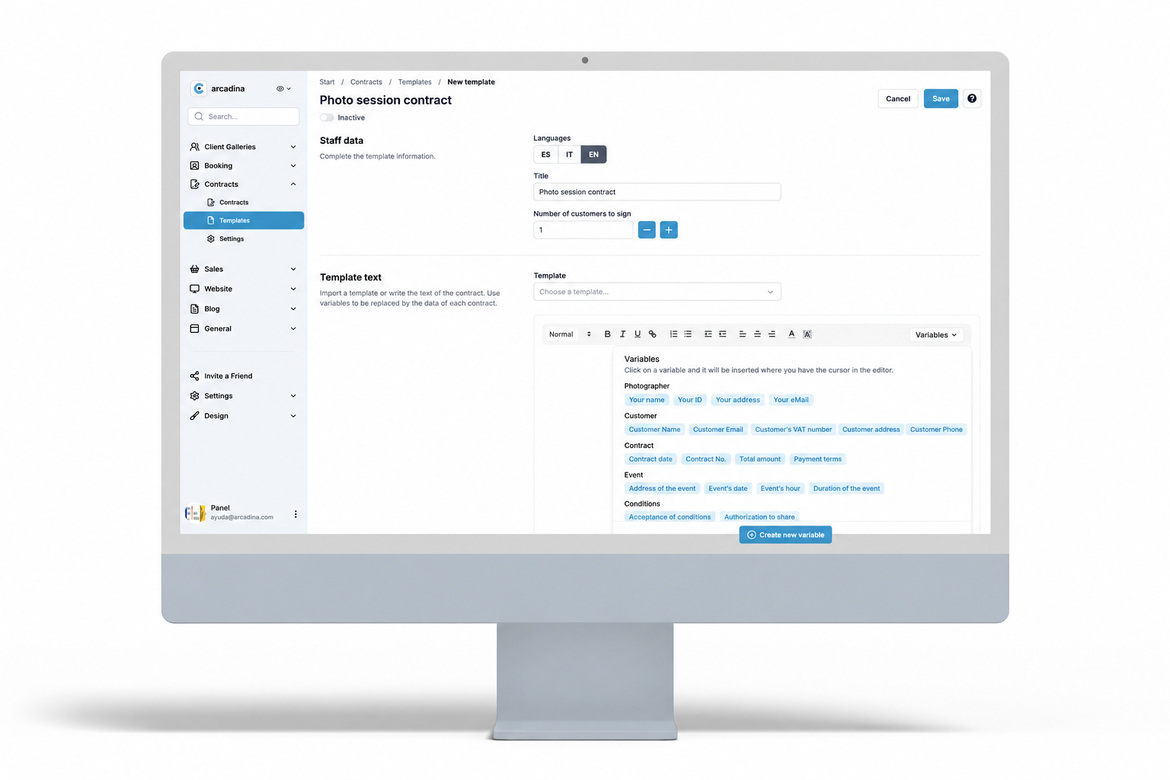
To prepare a client’s agreement, go to Contracts / Contracts and choose the option to create a new contract. You can import a template, choose the client and language, and specify how many people need to sign. Then complete the details requested by the dashboard for the variables you have used.
Review the wording and information before sending it. If details are still missing, you can save the contract as a draft and return to it when everything is ready.
Your client will receive an email with a link to read the agreement and sign it online from their device. You can see which contracts are signed and which are still pending. Read more in “You can now create and send contracts from your Arcadina website.”
You can also connect Contracts with Booking so a reservation generates the relevant agreement according to your settings. You will find the details in “Arcadina contracts and bookings are now connected.”
For a mini-session campaign, for example, preparing the right template helps you avoid starting from scratch for each family. First, check that the wording matches the offer on your booking page. The terms still need review even when the document is generated automatically.
With Arcadina’s online contracts for photographers, you can keep information organized and make signing easier for clients. They can review the agreement without visiting your studio, and you spend less time exchanging documents. It is a more convenient way to handle the paperwork and stay focused on your sessions.
What question do clients ask you most often before booking a photo session?
Arcadina is with you
Follow your ambitions and grow your photography career with us. You can try Arcadina free for 14 days, with no credit card required.
Arcadina is much more than a website: it provides business solutions for photographers to showcase their work, manage clients, and organize their services.
If you have questions, our Customer Support Team is available 24 hours a day, 7 days a week. We are here to listen.
Free trial · No card · No lock-in
Build your photography business online
Sales with no commission · Everything in one plan · 30-day free trial, no card